
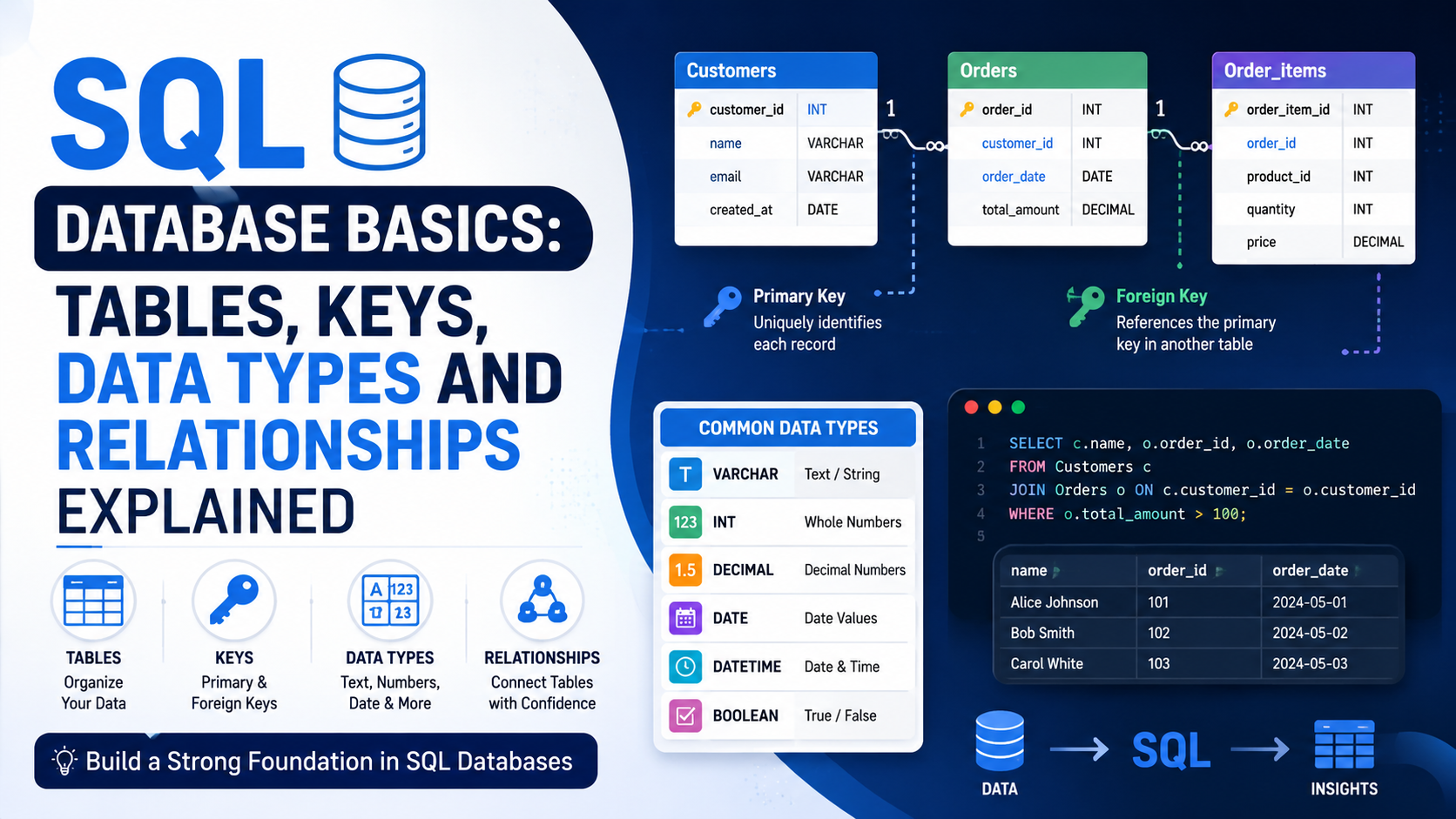
Most beginners jump straight into writing `SELECT` queries — and that’s exactly where things go wrong.
Without understanding **how a database is structured**, your queries fail, data gets duplicated, and table relationships become a mystery. Before you can query data effectively, you need to understand three fundamental pillars of SQL database design:
1. **Data Types** — what kind of data each column can store
2. **Constraints** — rules that keep your data clean and valid
3. **Relationships** — how tables connect to each other
Let’s break each one down clearly.
—
## SQL Data Types: Choosing the Right Column Type
Every column in a SQL table needs a defined **data type**. This tells MySQL:
– What kind of data the column accepts
– How much storage to allocate
– What operations (math, comparisons) are valid on that column
Choosing the wrong data type wastes storage, causes errors, and slows down queries.
### Numeric Data Types
| Data Type | Storage | Range | Best For |
|—|—|—|—|
| `TINYINT` | 1 byte | 0–255 / -128–127 | Ratings, boolean-like values, age |
| `SMALLINT` | 2 bytes | -32,768 to 32,767 | Small counters, year numbers |
| `INT` | 4 bytes | ±2.1 billion | IDs, quantities — most integers |
| `BIGINT` | 8 bytes | ±9.2 quadrillion | Social media IDs, transaction IDs |
| `DECIMAL(p,s)` | Variable | Exact decimals | Prices and financial data |
| `FLOAT` | 4 bytes | ~7 decimal digits | Scientific calculations |
| `DOUBLE` | 8 bytes | ~15 decimal digits | High-precision calculations |
> **Always use `DECIMAL` for money — never `FLOAT` or `DOUBLE`.**
> Due to floating-point imprecision, `FLOAT(0.1) + FLOAT(0.2)` may not equal `0.3`. Use `DECIMAL(10,2)` for exact financial values.
—
### String (Text) Data Types
| Data Type | Max Length | Storage | Best For |
|—|—|—|—|
| `CHAR(n)` | 255 chars | Fixed — always uses n bytes | Country codes, gender flags, fixed codes |
| `VARCHAR(n)` | 65,535 chars | Variable — uses only what’s needed | Names, emails, addresses, titles |
| `TINYTEXT` | 255 chars | Variable | Short labels, descriptions |
| `TEXT` | 65,535 chars | Variable | Comments, notes |
| `MEDIUMTEXT` | 16 MB | Variable | Blog posts, documentation |
| `LONGTEXT` | 4 GB | Variable | HTML content, large JSON data |
| `ENUM(‘a’,’b’)` | 65,535 options | Variable | Status fields with fixed choices |
> **`CHAR` vs `VARCHAR` — which to use?**
> `CHAR(10)` always stores 10 bytes, even for the word `’Hi’`. `VARCHAR(10)` stores only 3 bytes for `’Hi’` (2 chars + 1 length byte). Use `CHAR` for fixed-length codes like currency or country codes. Use `VARCHAR` for everything else.
—
### Date and Time Data Types
| Data Type | Format | Example | Best For |
|—|—|—|—|
| `DATE` | YYYY-MM-DD | `’2026-01-15’` | Date of birth, joining date |
| `TIME` | HH:MM:SS | `’09:30:00’` | Store hours, appointment times |
| `DATETIME` | YYYY-MM-DD HH:MM:SS | `’2026-01-15 14:32:00’` | Order timestamps, log entries |
| `TIMESTAMP` | YYYY-MM-DD HH:MM:SS | Auto-updates on row change | `created_at`, `last_updated` fields |
| `YEAR` | YYYY | `2026` | Academic year, fiscal year |
> **`DATETIME` vs `TIMESTAMP`:** `TIMESTAMP` automatically converts to UTC for storage and back to local time on retrieval — ideal for international apps. `DATETIME` stores exactly what you insert with no timezone conversion.
—
### Other Useful Data Types
| Data Type | Description | Example |
|—|—|—|
| `BOOLEAN` / `TINYINT(1)` | True/False stored as 0 or 1 | `is_active BOOLEAN DEFAULT TRUE` |
| `JSON` | Stores JSON documents | `metadata JSON` for flexible attributes |
| `BLOB` | Binary data (images, files) | `profile_picture MEDIUMBLOB` |
| `SET` | Multi-select string values | `notifications SET(’email’,’sms’,’push’)` |
—
## SQL Constraints: Rules That Protect Your Data
Constraints are rules applied to columns that **prevent invalid, duplicate, or incomplete data** from entering your database. Think of them as your first line of defence for data quality.
### 1. PRIMARY KEY — The Row’s Unique Identity
A Primary Key **uniquely identifies each row** in a table. It must be unique, cannot be `NULL`, and each table can only have one.
“`sql
CREATE TABLE students (
student_id INT PRIMARY KEY AUTO_INCREMENT,
first_name VARCHAR(50) NOT NULL
);
“`
`AUTO_INCREMENT` automatically assigns the next integer (1, 2, 3…) on every new insert — no manual ID assignment needed.
—
### 2. FOREIGN KEY — Linking Tables Together
A Foreign Key is a column that **references the Primary Key of another table**, creating a link between them. It enforces referential integrity — you can’t add an order for a customer that doesn’t exist.
“`sql
CREATE TABLE orders (
order_id INT PRIMARY KEY AUTO_INCREMENT,
customer_id INT NOT NULL,
order_date DATE NOT NULL,
amount DECIMAL(10,2),
FOREIGN KEY (customer_id) REFERENCES customers(customer_id)
);
“`
If you try inserting `customer_id = 999` but no customer with that ID exists, MySQL rejects the insert with a foreign key violation error.
—
### 3. NOT NULL — Makes a Field Required
Ensures a column **cannot be left empty**. Without `NOT NULL`, columns accept `NULL` by default.
“`sql
CREATE TABLE employees (
emp_id INT PRIMARY KEY AUTO_INCREMENT,
emp_name VARCHAR(100) NOT NULL, — Required
email VARCHAR(100), — Optional
phone VARCHAR(15) — Optional
);
“`
—
### 4. UNIQUE — No Duplicates Allowed
Ensures all values in a column are distinct. Unlike `PRIMARY KEY`, a table can have multiple `UNIQUE` constraints.
“`sql
CREATE TABLE users (
user_id INT PRIMARY KEY AUTO_INCREMENT,
email VARCHAR(100) UNIQUE NOT NULL,
username VARCHAR(50) UNIQUE NOT NULL,
phone VARCHAR(15) UNIQUE
);
“`
—
### 5. DEFAULT — Auto-Fill When No Value Is Provided
Specifies a fallback value used automatically when a column is omitted during `INSERT`.
“`sql
CREATE TABLE products (
product_id INT PRIMARY KEY AUTO_INCREMENT,
product_name VARCHAR(100) NOT NULL,
status VARCHAR(20) DEFAULT ‘active’,
stock INT DEFAULT 0,
created_at TIMESTAMP DEFAULT CURRENT_TIMESTAMP
);
“`
If `status` isn’t provided on insert, it defaults to `’active’`. If `stock` isn’t provided, it defaults to `0`.
—
### 6. CHECK — Custom Validation Rules
Validates that a column’s value meets a specific condition before the data is accepted.
“`sql
CREATE TABLE employees (
emp_id INT PRIMARY KEY AUTO_INCREMENT,
salary DECIMAL(10,2) CHECK (salary > 0),
age INT CHECK (age >= 18 AND age <= 65),
rating TINYINT CHECK (rating BETWEEN 1 AND 5)
);
```---### Constraints Quick Reference| Constraint | Purpose | NULL Allowed? | Multiple Per Table? |
|---|---|---|---|
| `PRIMARY KEY` | Unique row identifier | No | One only |
| `FOREIGN KEY` | Links to another table's PK | Yes | Yes |
| `NOT NULL` | Makes field mandatory | No | Yes |
| `UNIQUE` | No duplicate values | Yes (NULLs ignored) | Yes |
| `DEFAULT` | Auto-fills if not provided | Yes | Yes |
| `CHECK` | Custom validation | Yes (NULL passes) | Yes |---## Table Relationships: How Tables ConnectThe real power of a relational database is how tables **connect to each other**. Instead of one giant table with duplicated data, we split data into focused tables and link them using foreign keys.There are three types of relationships.---### One-to-One (1:1) RelationshipEach row in Table A matches **exactly one** row in Table B, and vice versa. This is the least common relationship — typically used to separate sensitive or rarely accessed data.**Example:** Each employee has exactly one passport.```sql
CREATE TABLE passports (
passport_id INT PRIMARY KEY,
emp_id INT UNIQUE NOT NULL, -- UNIQUE enforces the 1:1
passport_no VARCHAR(20) UNIQUE NOT NULL,
expiry_date DATE,
FOREIGN KEY (emp_id) REFERENCES employees(emp_id)
);
```The `UNIQUE` constraint on `emp_id` ensures no employee can have more than one passport.---### One-to-Many (1:N) Relationship — Most CommonOne row in Table A can relate to **many rows** in Table B, but each row in Table B relates to only one row in Table A.**Examples:**
- One customer → many orders
- One department → many employees```sql
CREATE TABLE customers (
customer_id INT PRIMARY KEY AUTO_INCREMENT,
name VARCHAR(100) NOT NULL,
email VARCHAR(100) UNIQUE
);CREATE TABLE orders (
order_id INT PRIMARY KEY AUTO_INCREMENT,
customer_id INT NOT NULL,
order_date DATE NOT NULL,
total DECIMAL(10,2),
FOREIGN KEY (customer_id) REFERENCES customers(customer_id)
);
```Many orders can reference one customer — but each order belongs to only one customer.---### Many-to-Many (M:N) RelationshipMany rows in Table A can relate to **many rows** in Table B. This requires a **junction table** (also called a bridge or pivot table) that holds foreign keys from both sides.**Example:** Students enrol in courses. One student takes many courses; one course has many students.```sql
CREATE TABLE students (
student_id INT PRIMARY KEY AUTO_INCREMENT,
name VARCHAR(100) NOT NULL
);CREATE TABLE courses (
course_id INT PRIMARY KEY AUTO_INCREMENT,
course_name VARCHAR(100) NOT NULL,
credits INT DEFAULT 3
);-- Junction table handles the Many-to-Many
CREATE TABLE enrolments (
enrolment_id INT PRIMARY KEY AUTO_INCREMENT,
student_id INT NOT NULL,
course_id INT NOT NULL,
enrol_date DATE,
grade DECIMAL(5,2),
FOREIGN KEY (student_id) REFERENCES students(student_id),
FOREIGN KEY (course_id) REFERENCES courses(course_id),
UNIQUE (student_id, course_id) -- Prevents duplicate enrolments
);
```---### Relationships Quick Reference| Type | Description | Real Example | How to Implement |
|---|---|---|---|
| One-to-One (1:1) | Each A matches exactly one B | Employee — Passport | `UNIQUE FOREIGN KEY` in child table |
| One-to-Many (1:N) | One A matches many Bs | Customer — Orders | `FOREIGN KEY` (no UNIQUE) in child table |
| Many-to-Many (M:N) | Many As match many Bs | Students — Courses | Junction table with two `FOREIGN KEY`s |---## Putting It All Together: A Mini School DatabaseHere's a complete example that combines data types, constraints, and all three relationship types.```sql
-- 1. Students
CREATE TABLE students (
student_id INT PRIMARY KEY AUTO_INCREMENT,
name VARCHAR(100) NOT NULL,
email VARCHAR(100) UNIQUE,
dob DATE,
city VARCHAR(50) DEFAULT 'India'
);-- 2. Courses
CREATE TABLE courses (
course_id INT PRIMARY KEY AUTO_INCREMENT,
course_name VARCHAR(100) NOT NULL,
credits INT DEFAULT 3 CHECK (credits BETWEEN 1 AND 6)
);-- 3. Teachers
CREATE TABLE teachers (
teacher_id INT PRIMARY KEY AUTO_INCREMENT,
name VARCHAR(100) NOT NULL,
subject VARCHAR(100)
);-- 4. Enrolments — Many-to-Many between Students and Courses
CREATE TABLE enrolments (
enrolment_id INT PRIMARY KEY AUTO_INCREMENT,
student_id INT NOT NULL,
course_id INT NOT NULL,
grade DECIMAL(5,2) CHECK (grade BETWEEN 0 AND 100),
FOREIGN KEY (student_id) REFERENCES students(student_id)
ON DELETE CASCADE,
FOREIGN KEY (course_id) REFERENCES courses(course_id)
);
```> **What is `ON DELETE CASCADE`?**
> When a student is deleted, all their enrolment records are automatically deleted too.
> Other options:
> – `ON DELETE SET NULL` — sets the foreign key to `NULL`
> – `ON DELETE RESTRICT` — (default) prevents deletion if child records exist
—
## Summary
Good SQL database design comes down to three things:
– **Pick the right data type** — it affects storage, performance, and accuracy
– **Add the right constraints** — they enforce data quality at the database level
– **Model relationships correctly** — split data into focused tables and link them with foreign keys
Master these three concepts and writing complex queries becomes significantly easier — because your data is clean, structured, and logically connected from the start.
